Work Order vs. Service Report: What to Record Before and After a Visit
A work order sets the scope; a service report records what happened. Follow one HVAC visit from dispatch and repair approval to the final invoice.
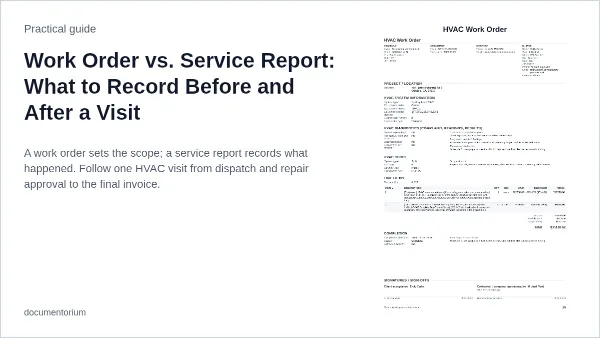
A work order assigns the job and records what work is authorized. A service report documents the visit: what the crew found, what they did, what they verified, and what's still open. One form can serve both purposes, but filling in the results shouldn't erase the original assignment or approval.
Use the HVAC work order to prepare an HVAC visit and the HVAC service report to document the outcome. The general work order and general service report serve the same roles for other trades.
What goes in a work order vs. a service report?
| Detail | Work order | Service report |
|---|---|---|
| Site and asset | Address, access contact, reported unit | Site visited and unit confirmed; note any mismatch or lack of access |
| Problem | Customer's complaint or maintenance request | What you verified, how you verified it, and what remains unconfirmed |
| Scope | Approved tasks, limits, and approval reference | Work performed, approval references for extras, and work left open |
| Time and parts | Scheduled window and parts to bring | Actual arrival and departure times; parts used or installed |
| Outcome | Checks the crew is expected to run | Check results, condition at departure, and who owns the next step |
Before dispatch: write down what is approved
Say a tenant reports that rooftop unit RTU-4 has stopped cooling and suspects the compressor. Record the complaint and the tenant's hunch in the work request intake, not as a diagnosis. On work order WO-184, identify the site, unit, person who can provide access, and person who can approve repairs. Write the limit plainly: “RTU-4 not cooling. Property manager approved a $125 diagnostic visit. Get separate approval before making repairs.” The person who unlocks the roof hatch isn't necessarily the person who can approve the repair.
Reference the accepted quote, agreement, or other approval on the work order. An internal dispatch ticket is not customer approval on its own. If approval is pending, say what, if anything, the crew can do in the meantime. The multi-trade work order guide covers the other details the crew needs before dispatch.
During the visit: check the asset and get approval for extra work
Verify the unit on site. If it doesn't match the work order, confirm which unit the approval covers before starting work. Here, the technician confirms RTU-4, finds a capacitor that measures below its specified range, and quotes $185 to replace it and recheck cooling. The property manager approves the quote by email at 10:45 a.m., as the agreement allows. The technician saves the approval with WO-184 before making the repair.
Follow the approval process required for the job. If it calls for a change order, keep the approved change with the original work order and carry the change number into the report and invoice. Update the crew's instructions without overwriting the original scope. The change order guide explains what to record.
At closeout: record what happened and what remains open
Give each visit its own report number. Include the service date, work-order number, and verified asset ID so the office can find the approval and the unit's service history. Documentorium's work order and service report are separate documents; enter the shared job reference on both.
An excerpt from the report might read:
SR-184-01 · WO-184 · RTU-4 — Visited 10:15–11:10 a.m. Capacitor measured below its specified range (see attached readings). Replaced it after the property manager's 10:45 a.m. approval. The unit ran in cooling during the 10-minute recheck and was left running. Performance outside that check wasn't verified.
Record readings with units and the conditions under which they were taken. If you didn't perform a check, mark it as not tested rather than passed. Use the RTU service report guide for help recording results and the work-order photo checklist for labeling photos by visit.
Check the customer's agreement for required fields, delivery deadlines, and sign-off. Label what a signature means: acknowledgment of receipt, acceptance of completed work, or approval of a specific charge are different things.
Before billing: match the invoice to the approval and the report
In this example, both the diagnostic visit and the flat-price repair were approved and completed. If the diagnostic fee isn't credited toward the repair, the invoice shows two lines: $125 for diagnosis and $185 for the capacitor replacement and recheck, for $310 before any applicable tax. Reference WO-184 and SR-184-01 so the office can trace both charges. If the agreement credits the diagnostic fee, show that credit. For time-and-materials work, check actual hours and parts against the agreed rates and any spending cap before billing.
Sources
Reviewed November 22, 2026.
- U.S. Department of Energy, Operations & Maintenance Best Practices Guide, §4.3: describes tracking work-order history by equipment, date, and the person who responded.
- Washington Department of Enterprise Services, HVAC contract 04224, Exhibit A, §4: requires a service report for completed work under that contract, with the service date, time, location, work performed, total hours, replaced parts, and recommendations.
- Indiana DNR, Turkey Run HVAC specifications, Part 6: accepts a service report or work order after covered visits and sets detail, delivery, and signature requirements for that contract.
Common questions
Can one document serve as both the work order and the service report?
Yes, if your agreement and applicable rules allow it. Keep the original scope and approval visible and put the visit results in a clearly labeled section. For example, Indiana's Turkey Run HVAC specifications accept either document and specify what it must include, when to send it, and who signs it.
Do I need a new work order for a return visit?
Not necessarily. Use the same work order if it covers the return and the agreement allows it. If the return adds work or costs outside the existing approval, obtain the required authorization first. Give the return visit its own report number even if you reuse the work order, and keep its findings, photos, and test results separate.
What should I record if no repair was made?
Record why no repair was made, such as pending approval, a declined repair, or no access. Note what you checked, any equipment condition you could verify at departure, who was notified, and who will follow up. Don't mark the repair complete.
What if nobody is available to sign the report?
Note that no signature was obtained. Follow the agreement's delivery and follow-up process and record when and to whom you sent the report. If sign-off is required, keep it open until it's obtained; proof of delivery isn't approval.